Friday, May 28, 2010

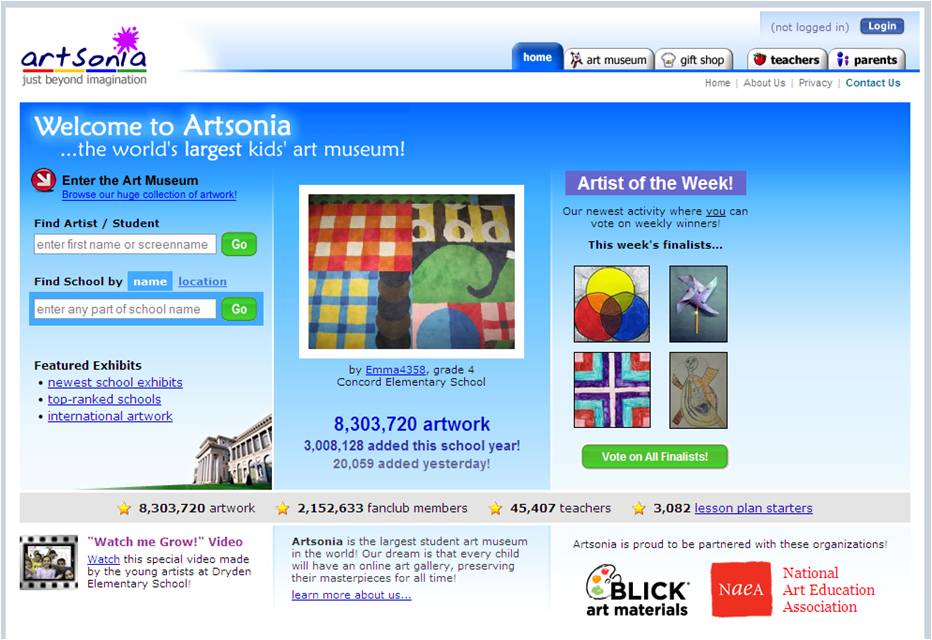
Artsonia- The World's Largest Kids' Art Museum


Are you or your art teachers looking for a place to publish and share your students' artistic creations?  Look no further.  Artsonia, a partner with the National Art Education Association,  is a great place to showcase student work, find art lesson plan starters, and purchase memorabilia like mugs, t-shirts, or tote bags featuring student work.  Parents can take a virtual tour of their child's artwork and purchase items.  15% of the sales proceeds  will go to the school.  Isn't that great!  Creating an account with Artsonia is free.  Thank you Ronda Wright for sharing this resource.

Thursday, May 13, 2010

Cybersafety... Tools you can use with your students to promote awareness


The Newark Public Schools created a Cybersafety eBoard to promote the safe and responsible use of technology. This site provides a myriad of resources that will help parents, students, and teachers understand the importance of using the internet with wisdom and caution.  Using this tool will provide  the user with videos, interactives, and websites that will show the end user how to be cyber safe.

http://www.cybersafety.newark.site.eboard.com/

Wednesday, May 12, 2010

All about SMARTboard Technology: SMART Exchange and SMART Notebook Express


Are you looking for a place to find interactive whiteboard lessons created for teachers by teachers?  Try the SMART Exchange.  This portal/database was designed to provide a virtual space where teachers can share lessons, find standards-aligned interactive lessons, and connect with colleagues from various places via forums.  One can even win a prize for sharing valuable resources with the SMART Exchange.

http://www.exchange.smarttech.com/index.html


If you do not have immediate access to the SMART Notebook software and need to use your interactive whiteboard, try SMART Notebook Express.  This web tool will allow you to use notebook files with your interactive whiteboard online without downloading the software.

http://express.smarttech.com/#

Click here to see the most recent SMART EDCompass Newsletter

Click here to view the SMART Notebook 10 Basics.

FYI: SMARTBoard Website got a facelift. Take a look.

http://www.smarttech.com/

Click here to find High School SMART Board Resources

Witchita Public Schools also has some great SMART Resouces.  Click here to check out their resources.

Creating eBooks Using PowerPoint


Using common technology tools like Microsoft PowerPoint, a digital camera and a microphone, teachers and students can easily create their own original talking electronic books. These books can be "played" on a computer. Another classroom application of the PowerPoint eBook is to use the same technology to create digital "Big Books" for class reading and other activities. Converting your eBook into a Big Book simply requires a projector connected to your computer and a screen.

Utilizing the highest level on Bloom's taxonomy, creating eBooks could satisfy the following New Jersey Core Curriculum Content Standards:

  • 3.1 (Reading)
  • 3.2 (Writing)
  • 3.3 (Speaking)
  • 3.4 (Listening)
  • 3.5 (Viewing and Media Literacy)

  • 8.1 (Technological Literacy)

Creating an eBook requires some very simple steps. We can follow these steps to create an eBook.
  1. Create a story (Using construction paper and markers)
  2. Digitally capture story pages (Using a digital camera or scanner).

  3. Create a PowerPoint Presentation
    1. Insert Slides (each slide if for a storybook page)
    2. Insert Digital Story Pages
    3. Narrate each story page

    4. Insert Action Buttons (Arrows)
      1. Next Page

  4. Enhance Presentation
    1. Color Background
    2. Slide Transition (to simulate turning pages)
  5. Save eBook and "Package for CD"
Click here to view a sample PowerPoint eBook.

Friday, April 30, 2010

EDIM 508- Developing the Respectful and Ethical mind via Google Earth

“Service is the rent we pay for living on this planet.” – Marion Wright Edelman

As global citizens, it is critical that our students develop ethical and respectful minds. Gardner states, "respect is equally important at the workplace and in civil society."(pg 116) With this in mind, this Google Earth Virtual Field trip seeks the whet the appetite for global stewardship in our middle school student.  Through a cross continental journey to countries that have needs and meeting real individuals who served to help their fellow global neighbors, this project hopes to have every middle school student impacted by this experience will develop a heightened sense of global empathy and improved global competency.  In short, on this journey, students will meet several Peace Corps volunteers, understand how each served in his assignment, and appreciate the value in the art of serving others.  

This project embodies the "Four  Ms"  mentioned by Gardner ("signposts toward the achievement of good work")  (Gardner pg. 148-149)
1. Mission- This project specifically tries to achieve the enduring understanding that within this world, there are places and people with great needs.  It would benefit all if we did our part to help others to improve their quality of life.

2. Models- Through this project, students are provided with models of service.  Multimedia was used to show them real people, positive individuals who "embodied good work" to serve others. 


3. Mirror test-individual version- Through the final assessment, an open ended question at the end of the journey, the student is asked if he can envision himself as a peace corps volunteer.  It also calls for further reflection, asking him where and how would he serve as a volunteer.


4. Mirror test-professional responsibility-This project seeks to call every student who participates into the spirit of collective global social responsibility to oneself and others.


It is my hope that we can use this virtual field trip as a preliminary lesson prior to the launch of our district's Journeys in Film pilot project.  It would benefit our students greatly if they can witness first hand the lasting impact of global community service through web 2.0 and multimedia.


Gardner, H. (2007). Five minds for the future. Boston: Harvard Business School Press.

Tuesday, April 27, 2010

EDIM 508 - An Educational Blog Worth Following

http://www.freetech4teachers.com/
Since 2007, Richard Byrne managed to bring his blog, Free Technology for Teachers, to the forefront of many educators' minds- 19,000+ to be approximate.  His resourceful, busy blog has a prominent RSS feed spot on the Ning I use to keep school-based technology coordinators abreast of current and future trends in educational technology and various free resources in information communications and collaboration technologies. This blog served as the catalyst that encouraged me to start a professional learning resource blog for teachers and coordinators in the City of Newark. 

I specifically love the way he introduces the free tool and specifically provides tangible, practical applications of each tool in the classroom.  It is the model I use when I post to my blog.

His blog posts definitely encourage the development of the Five Minds as summarized by Howard Gardner:
-Disciplined - As a Social Studies teacher, he provides many tools and resources to help teachers who teach the "scholarly discipline", history
-Synthesizing- I have personally used a  resource he shared on his blog, Yudu to help a school create online e-books and magazines with second graders who authored and illustrated stories about nutrition and making healthy choices.  Upon creating these books, one can embed them onto blogs or websites.  He also has a slide share that speaks on connecting the disciplines with web tools.
-Creating- Mr. Byrnes shows teachers how to map global learning and the arts by referring to Paintmap.com.  Imagine as a teacher, taking your students on a virtual field trip to help them make connections to the world through locating the origins of a piece of art or artist.
-Respectful-Nur.ph is a resource Mr. Byrnes exposed us to through his blog, this site helps us nurture the respectful mind by providing a virtual chat centered around web content.  Students can collaboratively work together to analyze and assess the effectiveness and appropriateness of websites.  Its a great way to promote media literacy.
-Ethical-"Everyone Does it ... Lessons in Internet Ethics" is an awesome post from this blog.  This post provides teachers with various ways and opportunities to expose students to conversations and experiences centered around ethical practices and decision-making.


Tuesday, April 20, 2010

EDIM 508 - Web Resources that Encourage Respectful and Ethical Minds

According to Julene Reed, “Tomorrow’s citizens must be global communicators, must be able to participate successfully in project-based activities, and must have collaborative skills.”Global competency and education are certainly essential tools for the 21st century learner. With these sentiments in mind, I can think of some really nice web resources that encourage purposeful and relevant collaborative experiences with students that would foster and encourage the respectful and ethical minds described in Howard Gardner's book:.

Adobe Youth Voices-
http://youthvoices.adobe.com/about/what/


Using multimedia software to engage and encourage our middle level-high school students to tell their digital stories, Adobe Youth Voices, empowers students to "create with purpose" with the hopes of encouraging stewardship and community activism. This website provides educators with wonderful resources that will help them plan, shape and implement engaging projects that integrate the use of dynamic multimedia software.

MAGPI (Mid-Atlantic Gigapop in Philadelphia for Internet2)
http://www.magpi.net/Programs-Events


MAGPI provides ample resources for an international network of K-12 educators, experts and students who participate in real-time, global experiences and projects via interactive video exchanges. In short, MAGPI serves as an ITV  “dating service” for educators, experts and students, providing the bridge that links educational vision, concepts and lesson plan objectives to hundreds of unique rich, authentic and compelling virtual experiences. Here are two examples of inquiry-based projects sponsored by MAGPI:

Arts and Humanities- Culture Convergence: Religion in Taiwan
Students in Taiwan provide a live presentation to American students to enlighten them about their culture and religious beliefs. The goal is to provide students with cultures that transcend beyond the boundaries of the western world.

Mathematics - International Math Challenge (grades 3-5)
Taking on the role of teacher, students are challenged to teach there global peers math games. This is a fun way to have a cultural exchange through learning math.

PeaceCorps World Wise Schools
http://www.peacecorps.gov/wws/educators/


This website brings the Peace Corps experience to life for both educators and students. One can't help but become empathetic toward others and excited about providing some level of service to a community that transcends beyond the backyard. Through this website you can:
-Connect to Peace Corps Volunteers via Correspondence
-Invite Peace Corps Volunteers to make a classroom visit
-Engage students through a plethora of lesson plans that link to true stories, folk tales, and letters from Peace Corps Volunteers
- Discover what is like to be a Peace Corps Volunteer, via Podcast, Video, Slide Show or by Playing the Interactive Peace Corps Challenge Game